


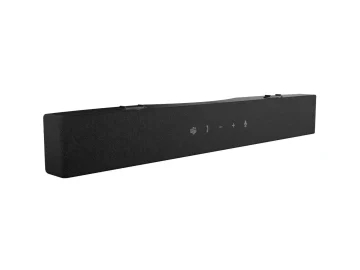
Dell SB725 Pro Premium Conferencing Soundbar
Product:
Genuine Original Dell product
Complete with
- Dell Pro Premium Conferencing Soundbar – SB725
- Security chain
- Documentation
Compatibility
- P-Series Monitors
- P-Series P2222H
- P-Series P2223HC
- P-Series P2225H
- P-Series P2422H
- P-Series P2422HA
- P-Series P2422HE
- P-Series P2423
- P-Series P2423D
- P-Series P2423DE
- P-Series P2425H
- P-Series P2425HE
- P-Series P2425
- P-Series P2425E
- P-Series P2425D
- P-Series P2425DE
- P-Series P2721Q
- P-Series P2722H
- P-Series P2722HE
- P-Series P2723D
- P-Series P2723DE
- P-Series P2723QE
- P-Series P2725H
- P-Series P2725HE
- P-Series P2725D
- P-Series P2725DE
- P-Series P2725QE
- P-Series P3221D
- P-Series P3222QE
- P-Series P3223DE
- P-Series P3223QE
- P-Series P3225QE
- P-Series P3225DE
- P-Series P3421W
- P-Series P3421WM
- P-Series P3424WE
- P-Series P3425WE
- U-Series Monitors
- U-Series U2421E
- U-Series U2422H
- U-Series U2422HE
- U-Series U2422HX
- U-Series U2424H
- U-Series U2424HE
- U-Series U2722D
- U-Series U2722DE
- U-Series U2722DX
- U-Series U2723QE
- U-Series U2723QX
- U-Series U2724D
- U-Series U2724DE
- U-Series U2725QE
- U-Series U3023E
- U-Series U3223QE
- U-Series U3225QE
Dell P/N
H4P95, 0H4P95, 9618G, 520-BBLY
Specifications
Technical Information
Connectivity Technology
Wired
Cable Length
150 mm
Active Noise Canceling (ANC)
No
Artificial Intelligence Noise Cancelling (AINC)
Yes
Features
LED Status Indicator
Microphone
Microphone Frequency Response
110Hz to 14kHz
Microphone Pickup Range
2.3 m
Speaker
RMS Output Power
3.60 W
Speaker Size/Type
52 mm
Sound Pressure Level
90dB @ 0.5m
Speaker Frequency Response
150Hz to 20kHz
Interfaces/Ports
USB
Yes
Controls/Indicators
Status Indicators
Mute
Teams Active/Notifications
Controls
Volume Up
MS Teams
Volume Down
Call
End
Physical Characteristics
Height
40 mm
Width
297 mm
Depth
35 mm
Weight (Approximate)
253 g
Miscellaneous
Package Contents
Soundbar
Security Chain
User documentations
Operating System Supported
Windows 11 (64-bit)
Windows 10 (64-bit)
Mac OS
Software Supported
Dell Display and Peripheral Manager
Key Features
Welcome to seamless audio
Distraction-free communication. Crystal-clear sound quality.
Elevate clarity in every call
Designed to improve both speech clarity and sound quality, delivering pristine audio on every conference call.
AI-based noise cancellation
Dual-directional AI noise cancellation distinguishes human voices and reduces background distractions, ensuring seamless communication on both ends.
Flawless conversation
Echo cancellation removes acoustic feedback and audio distortion, delivering clear and natural voice communication.
Superior audio experience
High-performance drivers deliver balanced sound, clearer speech, and enhanced audio quality.
Streamline your workspace
Keep your workspace clutter-free with effortless integration to Dell monitors via magnetic attachment, simple setup, and compatibility with 40+ displays.
Optimised collaboration
This soundbar is compatible with leading UC platforms and certified for Microsoft Teams and Zoom.
Dell Display and Peripheral Manager
Experience Dell’s singular, innovative application to optimise the performance of your entire Dell PC workspace.
Customise your audio experience
This app allows users to adjust device settings and customise audio preferences by assigning preset modes such as Speech, Bass Boost, and Treble Boost. Additionally, users can create personalised audio presets using the Audio Equalizer, enable or disable Sound Notifications, and receive the latest firmware updates.
More manageable
Save time and boost IT efficiency with the Dell Device Management Console to manage your Dell peripheral fleet at scale, from a single cloud-based console. Discover expanded Command Line Interface features from Dell Display and Peripheral Manager.


Reviews
There are no reviews yet.