


Dell Targus APB081 140W Power Bank
Product:
Genuine Original Dell product.
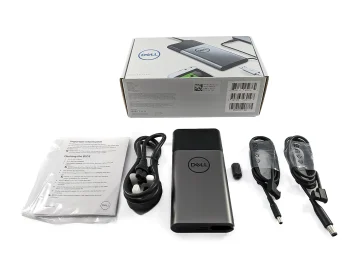
Complete with
- 1 x Targus 86.4Wh Laptop Power Bank
- 1 x EPR (Extended Power Range) charging cable
- User guideUser guide
Model
APB081
Make
Targus 140W 86.4Wh USB-C Portable Power Bank
Dell P/N
HKMG9, W96HN, 451-BDJG
Ports & Slots
1 x Output USB-A 5V/2A 10W , 1 x Output USB-C Up to 140W PD 3.1 and Input USB-C (5V, 9V, 15V, 20V, 28V), 1 x USB-C Up to 140W PD 3.1
Specifications
Product Specifications
Input Specifications
Port 1: USB-C DRP connector
Protocols: PD3.0/PPS/BC1.2/Apple 2.4/Samsung AFC/QC/Huawei SCP/FCP
Max Power Input: 60W
Voltage/Current Ratings: Standard Power Range
5V @ 3A (15W)
9V @ 3A (27W)
12V @ 3A (36W)
15V @ 3A (45W)
20V @ 3A (60W)
Output Specifications
Output 1 (USB-C1, DRP connector)
Protocols: PD3.1/PPS/BC1.2/Apple 2.4/Samsung AFC/QC/Huawei SCP/FCP
Max Power Output: 140W
Voltage/Current Ratings: Standard Power Range
5V @ 3A (15W)
9V @ 3A (27W)
12V @ 3A (36W)
15V @ 3A (45W)
20V @ 3A (60W) – Requires a 5A cable
Voltage/Current Ratings: Extended Power Range
28V @ 5A (140W) – Requires an EPR cable
PPS: 5V–21V @ 5A
Requires a 5A cable to exceed 3A.
Output 2 (USB-C2, DRP USB-IF certified connector)
Protocols: PD3.1/PPS/BC1.2/Apple 2.4/Samsung AFC/QC/Huawei SCP/FCP
Max Power Output: 140W
Voltage/Current Ratings: Standard Power Range
5V @ 3A (15W)
9V @ 3A (27W)
12V @ 3A (36W)
15V @ 3A (45W)
20V @ 3A (60W) – Requires a 5A cable
Voltage/Current Ratings: Extended Power Range
28V @ 5A (140W) – Requires an EPR cable
PPS: 5V–21V @ 5A
Requires a 5A cable to exceed 3A.
Output 3 (USB-A connector)
Protocols: BC1.2, Apple 2.4
Voltage/Current Ratings: Standard Power Range
5V @ 2A (10W)
Power Profile
Single Output:
USB-C1: 140W Max
USB-C2: 140W Max
USB-A: 10W Max
Dual Outputs:
USB-C1 + USB-A: 100W + 10W (110W Max)
USB-C2 + USB-A: 100W + 10W (110W Max)
USB-C1 + USB-C2: 65W + 65W (130W Max)
All Outputs:
USB-C1 + USB-C2 + USB-A: 100W + 30W + 10W (140W Max)
USB-C1 + USB-C2 + USB-A: 65W + 45W + 10W (120W Max)
All outputs are isolated and do not share an output rail. When charging multiple devices from the Power Bank, each port must be able to do independent protocol negotiation. Every time a new device is inserted into an output port, all ports must reset and renegotiate power capabilities.
Key Features
Lightning-Fast Charging on the Go
Keep your Dell laptops and tablets charged anywhere.
Lightning Fast, Reliable Charging
The Targus 140W USB-C Portable Power Bank is equipped to deliver 140W PD 3.1 charging capacity, so your devices are fully charged in no time.
Lightweight and Portable, Safe for Airline Travel
Designed to be airline-safe and super portable, this power bank is an ideal charging solution when traveling.
Safety First
This ultra-fast USB power bank offers protection from overcharging, over voltage, over-current, and over-heating. Leverage USB-A charging and USB-C charging without worry. All Targus products pass third-party compliance testing and have a fire-retardant rating which meets UL requirements.
Charging the Power Bank
Using the USB-C cable, connect the USB-C connector to the Power Bank, and the other connector to a USB charger. The 4 LED lights will begin to flash when the Power Bank is charging. When all 4 LEDs are lit, the unit is fully charged. Charging will take 3-4 hours depending on the source.
Using the Power Bank
To power and charge your device from the Power Bank, use the sync and charge cable that came with your device or the included USB-C cable. Connect the standard USB connector to the Power Bank and connect the other end of the cable to your device. Push the power button. The LEDs will turn on briefly, and your device will begin to charge. To check the battery level, press the power button; the LEDs will indicate the remaining power level. To turn off the power and LED, press and hold the power button. To enable low-power mode, double-click the power button. To return to normal mode, double-click the power button. It is recommended to use low-power mode to charge low-power accessory devices such as Bluetooth headsets and smartwatches.


Reviews
There are no reviews yet.